Google Ad Grants Reinstatement: Why Accounts Get Deactivated and How to Get Back
By Mike Krieg · Updated October 23, 2026
To reinstate a Google Ad Grants account, find the rule that caused the deactivation, fix it along with anything else out of compliance, and submit Google's Request to reactivate Ad Grants account form. Google reviews the account against its rules; it doesn't promise reactivation, and a request sent before the fixes are in place wastes time.
This guide covers the three things that can happen to a grant account, the fix for each cause, and the form itself. Rules link to Google's pages as of October 2026. Plain about our experience: Storyline, the nonprofit that runs alongside NonProfitSaver, has not been deactivated, so this is what Google documents, not a process we've been through ourselves.
Deactivated, suspended or cancelled
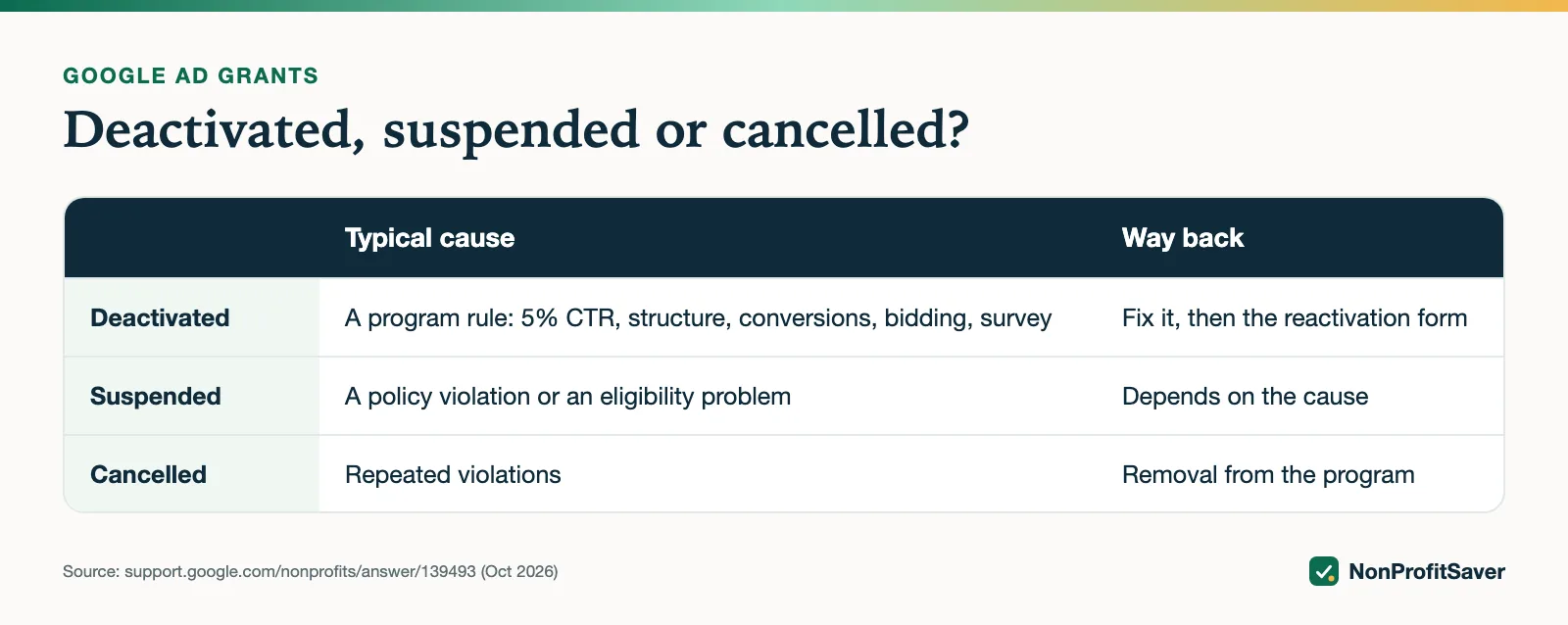
Google uses three words, and they aren't the same.
| What happened | Typical cause | Way back |
|---|---|---|
| Temporarily deactivated | A program rule: 5% CTR, account structure, conversion tracking, bidding, or the program survey | Fix it, then the reactivation form |
| Suspended | A policy violation, or an eligibility problem with your organization | Depends on the cause; can block every Google for Nonprofits product |
| Cancelled | Repeated violations | Google says the account "may be cancelled and removed from the Google Ad Grants program" |
The last line comes from Google's Fix a deactivated account page. The reactivation form adds that "An account may be suspended permanently for repeated violations or an egregious violation." A first deactivation is common and fixable. Repeating it is what puts the grant at real risk.
How you'll know, and how to find the reason
Google's compliance guide says it "primarily use[s] in-product notifications" to tell you about non-compliance. Sign in at ads.google.com, open the grant account, and read the notifications and any account-level banner. Also check the notification email address. Google's account management policy warns that "Any account found in violation of program policies is subject to automatic suspension without notification," so don't wait for an email.
If you can't get into the account at all, that's an access problem, not a deactivation; see Google's Access your Google Ad Grants account page.
The five deactivation causes and their fixes
All five come from Google's account management policy, as of October 2026.
1. Click-through rate below 5%
"If the CTR requirement isn't met for 2 consecutive months, your account will be temporarily deactivated." The fix is to pause high-impression, low-CTR keywords until the account clears 5%.
Google's CTR page says exactly what it will look at: filter for enabled campaigns and keywords, and the "Total: filtered keywords" row "must be >=5% when you request reactivation to be approved." Use the last 7 days the account had impressions, since a deactivated account has none now. The same page elsewhere says to pause until that row reaches 4%; the requirement for reactivation is 5%, so aim there.
Two more points from that page: accounts "will not be reviewed for this requirement until 90 days old," and Smart campaigns are exempt from the 5% rule if you can't make the changes needed in a standard campaign. How to raise CTR without gutting your traffic is in our 5% CTR guide.
2. Account structure
Every campaign needs location targeting that matches where your services are useful, and the account needs at least 2 unique sitelinks. The reactivation form's checklist also asks for "at least 2 text ads per enabled ad group, at least 2 ad groups per enabled campaign, and active sitelinks."
3. Conversion tracking
Accounts created on or after 1 January 2018, or any account using conversion-based Smart bidding, need valid conversion tracking and "at least 1 conversion per month." Google's compliance guide adds that "Your total number of clicks should not nearly equate to your total number of conversions," which signals broken tracking. Set it up with our conversion tracking guide, confirm a real conversion records, then request reinstatement.
4. Bidding
Accounts created on or after 22 April 2019 must use conversion-based Smart bidding on every campaign. If you're deactivated for bidding, Google's policy says "You can begin with Maximize clicks to gather initial traffic and data," but must set up conversion tracking immediately and move to Maximize conversions or Maximize conversion value once you have "typically 15-30 conversions in the last 30 days."
Older accounts aren't covered by this rule. Storyline's account was created in December 2017, so on 23 October 2026 it switched to Maximize clicks with a $2 per-click limit as normal practice, not as a reinstatement step. Check your account's creation date before you assume which rules apply.
5. Program survey
Google sends a program survey and requires a response. Its compliance guide says the survey is annual and goes to the login email addresses on the account, and that if Google still shows it as incomplete, you should resubmit it with the correct customer ID. Answer it, then request reinstatement.
Fix everything, not just the named cause
The reactivation form opens with a checklist. Before you submit, Google asks you to confirm:
- conversion tracking installed and recording, if your account uses automated bidding or was created since 1 January 2018;
- no active keywords with Quality Score 1 or 2;
- no non-approved single-word or overly generic keywords;
- campaigns geo-targeted to your scope of service;
- account-level CTR for active keywords above 5% for the last 7 days of activity;
- at least 2 ads per ad group, 2 ad groups per campaign, and active sitelinks;
- a website that complies with the website policy.
Work through every line; a request that fixes CTR but leaves a Quality Score 2 keyword running gives the reviewer a reason to say no. More detail: Google Ad Grants requirements.
Submitting the reactivation request, step by step
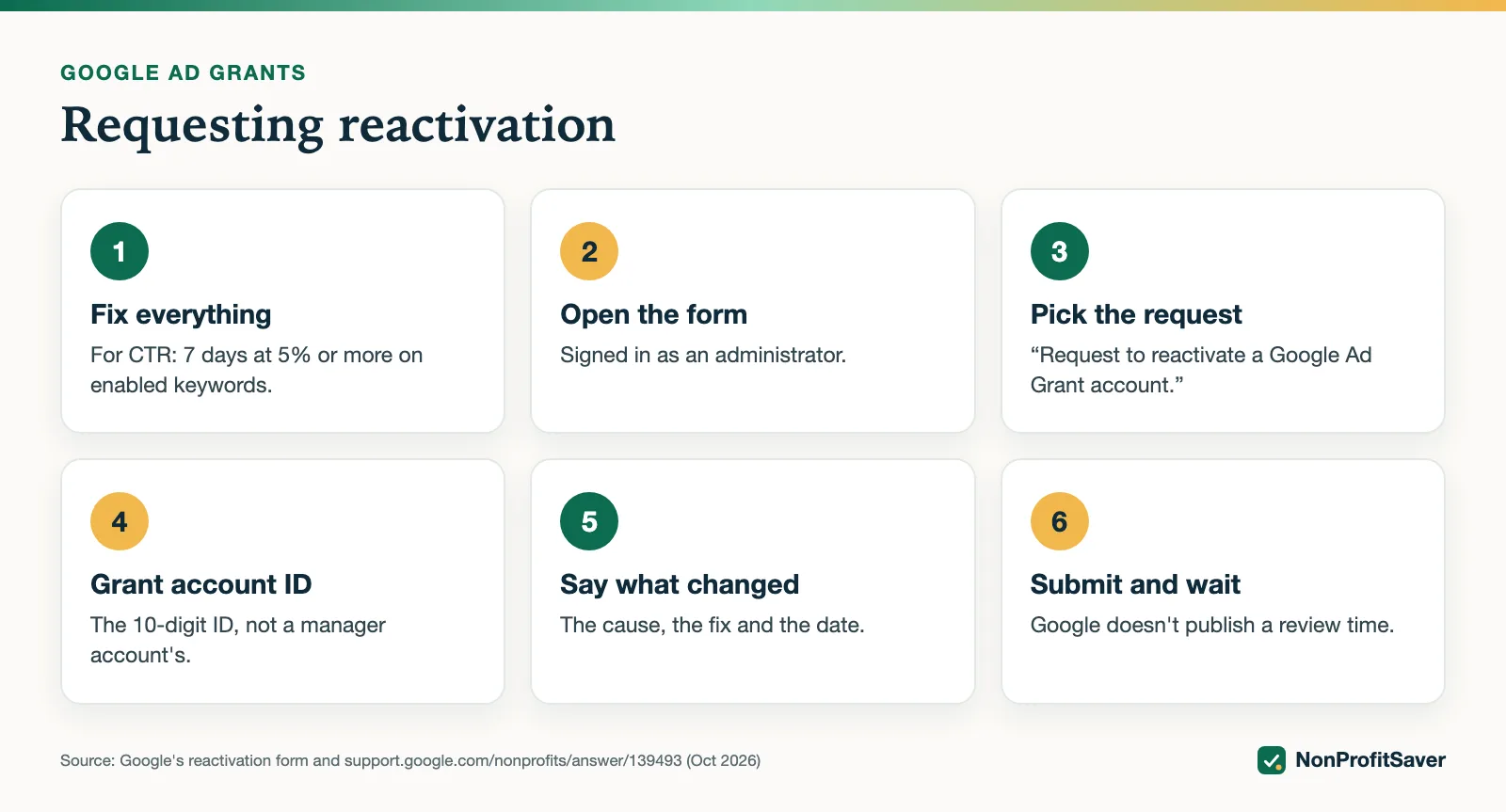
- Make the fixes above and give them time to show. For CTR, that means 7 days of activity at 5% or more on enabled keywords.
- Open the form from Google's Fix a deactivated account page, signed in with an administrator's Google Account.
- Choose "Request to reactivate a Google Ad Grant account." The same form also handles keyword exception requests.
- Enter the Customer ID of the grant account itself, the 10-digit number. The form says not to enter a manager account's ID if you're an agency, and to use "a customer ID that's linked to your account" to avoid delays.
- Explain what you changed in the message box: the cause, the fix, and the date.
- Decide on one-time approval. The form offers to let the Ad Grants team "make changes to your account to bring it into full policy compliance," within 5 business days. Read the terms: Google "doesn't guarantee or promise any particular results," you're responsible for the effect on your campaigns, and changes you make while they're working "may be lost." If you agree, stop editing until they confirm.
- Submit and wait. Google doesn't publish a review time. The form says some areas "may require your action" and that it "cannot guarantee that your Ad Grants account will be reactivated."
Don't create a new Google Ads account to get around a deactivation. Google's activation page says not to create one at any point, and a regular account isn't a grant account.
When it's a suspension instead
A suspension can reach beyond Ad Grants. Google's suspended accounts page lists the common causes: serious ad policy violations such as Abusing the ad network or Misrepresentation, losing nonprofit status, not meeting eligibility criteria, needing re-verification (for organizations registered before 2016), and repeated violations. A suspended Google for Nonprofits account "will be unable to activate new products or re-activate existing Google products."
What to do depends on the cause:
- An ad you think was wrongly disapproved: Google links an ad approvals contact form from the same page.
- Eligibility or re-verification: fix the status issue with Goodstack; see Google Ad Grants eligibility and the Google for Nonprofits account.
- Bidding or performance: Google's budgets page says to read the suspension email for the specific policy, fix it, and then use the same reactivation form.
Getting help from Google
Searches for "Google Ad Grants help," "support" and "contact" all lead to the same few places, as of October 2026:
- Help center. The old support.google.com/grants address now redirects into the Google for Nonprofits Help Center, where the Ad Grants articles live.
- Contact page. Google for Nonprofits contact asks what you need, then shows the options available for your issue. We can't tell you in advance whether you'll be offered chat, email or a call.
- Community. The Google for Nonprofits community is a public forum; don't post anything private.
- Ad Grants team emails. Opting in, per Google's notifications page, gets you announcements of live streams, workshops and office hours.
- Agencies. Google keeps a directory of vetted agencies; see Ad Grants Certified Professionals.
Keeping it from happening again
The CTR rule needs two consecutive months below 5% to trigger, and the conversion rule is monthly, so a weekly look at CTR, conversions, Quality Score 1 and 2 keywords and notifications gives you time to act. The reactivation form itself suggests creating an automated rule to pause low Quality Score keywords automatically. Our Google Ad Grants Kit ($97 once, early access; sales haven't opened yet) includes a weekly check that flags these, and a campaign builder that won't write a structure the rules forbid. Plain about our interest: it's our paid product, and everything in this guide works from Google's free pages without it.
Frequently asked questions
How do I get my Google Ad Grants account reactivated?
Fix every policy problem first, then submit Google's Request to reactivate Ad Grants account form with your grant account's 10-digit Customer ID. For a click-through rate deactivation, your enabled keywords must show at least 5% CTR over the last 7 days of activity before you ask.
How long does Ad Grants reinstatement take?
Google doesn't publish a review time for reactivation requests. If you give the Ad Grants team one-time approval to make compliance changes for you, the form says they make them within 5 business days.
What is the difference between deactivation and suspension in Ad Grants?
Deactivation is temporary and tied to a fixable program rule, such as the 5% CTR or a missing survey response. Suspension is for policy violations or eligibility problems, can affect your whole Google for Nonprofits account, and repeated or serious violations can end participation.
Related guides
- Google Ad Grants for Nonprofits: How It Works, the Rules and the Catch
- Google Ad Grants for Churches: Who Qualifies and What Paperwork Works
- How to Apply for Google Ad Grants, Step by Step
- Google Ad Grants Requirements: The Compliance Checklist
This guide is general information, not legal, tax, or financial advice. Prices change; see each linked source. Report a correction.