Google Ad Grants Bidding: Maximize Conversions, Maximize Clicks and the $2 Cap
By Mike Krieg · Updated October 23, 2026
If your Ad Grants account was created on or after 22 April 2019, every campaign must use conversion-based Smart bidding: Maximize conversions, Maximize conversion value, Target CPA or Target ROAS. Maximize conversions is the usual choice, and Google says it can bid above the program's $2.00 maximum when performance merits; Maximize clicks is only for older accounts or for recovering from a deactivation.
This guide sets out the rule, what Google says today about the $2 cap, how the rules got here, and what happened when Storyline, the nonprofit that runs alongside NonProfitSaver, switched its own account in October 2026.
The rule
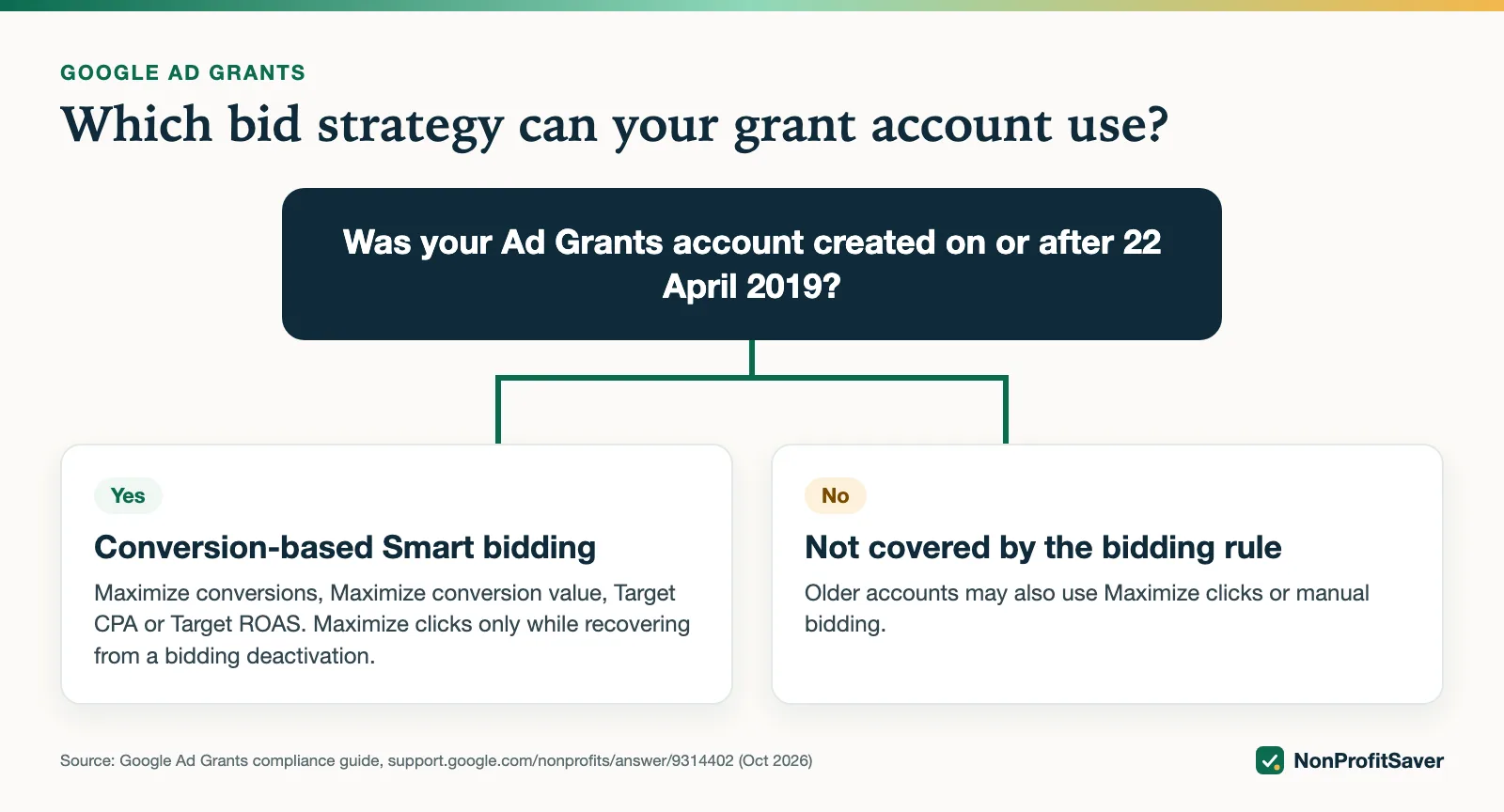
Google's program policies say, as of October 2026, that "accounts created on or after April 22, 2019 must use conversion-based Smart bidding for all campaigns", and that "Each campaign must use either Maximize conversions, Maximize conversion values, Target CPA, or Target ROAS bidding." The same page names an exception for Smart campaigns, and warns that non-compliant campaigns "are subject to automatic bid strategy changes".
Two consequences:
- Your account's creation date decides your options. Look it up before choosing. If you don't know it, ask Google's Ad Grants support.
- Smart bidding needs conversions. Google's budgets and bidding page says "Smart Bidding relies heavily on accurate conversion tracking data". Set up tracking first: Ad Grants conversion tracking with GA4.
The strategies compared
| Strategy | Allowed for accounts created on or after 22 Apr 2019? | Can bid above $2.00? | Best for |
|---|---|---|---|
| Maximize conversions | Yes | Yes, per Google's tips page | Most grant campaigns, from day one |
| Maximize conversion value | Yes | Google's tips sentence doesn't name it | Accounts that give conversions different values (donations by amount) |
| Target CPA | Yes | Yes, per Google's tips page | Campaigns with steady conversion history |
| Target ROAS | Yes | Yes, per Google's tips page | Accounts tracking donation revenue |
| Maximize clicks | No, except while recovering from a bidding deactivation | Not in Google's exception, so treat as no | Older accounts; the first weeks of a reinstatement |
| Manual CPC | No | Not in Google's exception, so treat as no | Older accounts that want full control |
The budgets and bidding page recommends Maximize conversion value where conversions have values and "Maximize conversions for all other goals", and calls Target CPA and Target ROAS "useful for more advanced strategies".
Does the $2 cap still apply?
Partly. Google's Ad Grants tips page says, as of October 2026: "In Ad Grants, using Maximize conversions, Target CPA, or Target ROAS bidding strategies allows the system to bid over the program-level $2.00 USD max bid if your account's performance merits."
So the $2.00 program-level maximum still exists, and those three Smart strategies can go above it. Our reading is that strategies outside that exception, Maximize clicks and manual bidding, stay at $2.00 or below, which is why Storyline sets its Maximize clicks limit at exactly $2.00. The sentence doesn't mention Maximize conversion value, and we couldn't find a Google page that settles whether it can exceed $2. We also couldn't find the $2.00 figure on Google's program policies page itself; it appears on the tips page.
How the rules got here
Google's current help pages state the rules, not their history, so treat this section as background:
- Agency write-ups describe a long-standing $2.00 limit on cost-per-click bids, and Google's tips page still calls $2.00 the "program-level" maximum.
- An agency write-up from Media Cause (a third party, not Google) reports that in January 2019 Google began letting Maximize conversions bid above $2.
- Google's own policy page dates the conversion-bidding requirement: it applies to accounts created on or after 22 April 2019.
Accounts that existed before that date kept their older options, which is why two grant accounts can follow different bidding rules today.
What we saw: switching a 2017 account
Storyline's grant account was created in December 2017, so the 22 April 2019 rule doesn't cover it. On 20 October 2026 it went live with six search campaigns on Maximize conversions. Over the next three days the whole account had 13 impressions and 1 click, and that one click cost $7.55 of grant. That is consistent with Google's statement that Maximize conversions can bid above $2.00.
Google's status on every campaign read "Eligible (Limited): conversion tracking setup is incomplete, new bid strategy is learning". Conversion tracking was imported, but no one had converted, because almost no one had seen an ad. Smart bidding had nothing to learn from. The full diagnosis is in why a new Ad Grants account barely shows.
On 23 October 2026 Storyline switched all six campaigns to Maximize clicks with a $2.00 maximum cost-per-click limit. It did this in Google Ads Editor with a three-column paste:
| Campaign | Bid Strategy Type | Maximum CPC bid limit |
|---|---|---|
| Storyline Study | Maximize clicks | 2.00 |
| Bible verses | Maximize clicks | 2.00 |
(and so on for each campaign). How that paste works: Google Ads Editor for Ad Grants. Storyline's new Spanish campaign, SENT (ES), was built on Maximize clicks with the same $2.00 limit from the start.
We don't have results from the switch yet and won't guess. We'll update this page once there are enough days of data to compare.
If your account is newer than 22 April 2019
Maximize clicks isn't an option for you, so a stalled account has to be fixed through conversions:
- Confirm a meaningful conversion actually records, by completing your own sign-up and watching it arrive in Google Ads.
- Put a clear sign-up on every page you advertise: Ad Grants landing pages.
- Don't inflate conversions with page views to "teach" the algorithm. The compliance guide says clicks should not nearly equal conversions.
- Give a new strategy time. Google shows a learning status while it gathers data.
If you were deactivated for bidding
The program policies say that if your account is deactivated for bidding, "You can begin with Maximize clicks to gather initial traffic and data", set up conversion tracking immediately, and switch to Maximize conversions or Maximize conversion value once you have enough data. Google gives about 15 to 30 conversions in the last 30 days as a starting point, then you request reinstatement.
One inconsistency to know about: Google's budgets and bidding page offers "begin with Maximize clicks" as general advice for anyone with no conversion data, without repeating the account-date rule. The program policies are the rule, so if your account is newer than 22 April 2019 and not deactivated, stay on a conversion-based strategy.
Budgets, briefly
Google's budgets page says the grant is "limited to a monthly budget of $10,000 USD, which equates to a daily budget of $329 USD", and that this "is a limit, not a guarantee of spend". You split the $329 across campaigns. Raising a campaign's budget won't make it spend if bidding or keywords are holding it back.
With or without the kit
Choosing a strategy takes one setting per campaign, and everything here is on Google's free pages. Our Google Ad Grants Kit ($97 once, early access; sales haven't opened yet) includes a campaign builder that defaults to Maximize conversions and refuses Maximize clicks unless you state why your account may use it (created before 22 April 2019, or reinstating). Plain about our interest: it's our paid product. It's built on the workflow we use for Storyline' own Ad Grants account, which has days of data, not months.
Frequently asked questions
Do I have to use Maximize conversions in Google Ad Grants?
If your account was created on or after 22 April 2019, every campaign must use a conversion-based Smart bidding strategy: Maximize conversions, Maximize conversion value, Target CPA or Target ROAS. Maximize conversions is the usual starting point.
Does the $2 bid cap still apply to Ad Grants?
Google still describes a program-level $2.00 maximum bid. Its Ad Grants tips page says Maximize conversions, Target CPA and Target ROAS can bid above it when performance merits. Maximize clicks and manual bids stay under it.
Can an Ad Grants account use Maximize clicks?
Accounts created before 22 April 2019 aren't covered by the conversion-bidding rule. Newer accounts can start with Maximize clicks only while recovering from a deactivation for bidding, then must switch back.
Related guides
- Google Ad Grants for Nonprofits: How It Works, the Rules and the Catch
- Google Ad Grants for Churches: Who Qualifies and What Paperwork Works
- How to Apply for Google Ad Grants, Step by Step
- Google Ad Grants Requirements: The Compliance Checklist
This guide is general information, not legal, tax, or financial advice. Prices change; see each linked source. Report a correction.