Ad Grants Search Terms and Negative Keywords: Find the Wrong Searches and Block Them
By Mike Krieg · Updated October 23, 2026
The Search terms report shows the actual searches that triggered your ads, and negative keywords stop your ads from showing on the ones you don't answer. In an Ad Grants account this matters more than usual, because every impression without a click counts against the 5% click-through rate the grant requires.
This guide shows where the report is, how to judge each search, how negative keyword match types behave, and the negatives Storyline set on its Spanish campaign before launch. Choosing the keywords themselves is covered in Google Ad Grants keywords.
Why Ad Grants accounts need this more than paid ones
Two reasons. First, Google's program policies say, as of October 2026, that an account below 5% click-through rate for 2 consecutive months will be temporarily deactivated. Searches that only loosely match your keyword get impressions and few clicks.
Second, the mission-based campaigns policy applies to "keywords and queries". Its list of what's not permitted includes single-word and overly generic terms, and twice it says to "Check Search Terms Report to add negative keywords where needed", once specifically for exact-match negatives against single-word searches. So Google expects grant accounts to use this report.
Where to find the report
Google's search terms report page gives the path, as of October 2026: select Campaigns in the left navigation, then Insights and reports, then Search terms.
Three things to know before you read it:
- Not every search is listed. Google omits search terms "that don't have enough query activity", for privacy. A new account with few impressions may show very little.
- The match type column tells you how closely each search matched your keyword. Close variants (plurals, abbreviations, acronyms) show up here.
- In the Report editor version you can't add negatives directly. Google's page says so for that view. Copy the terms into a negative list instead, or work from the main Search terms table.
How to judge each search
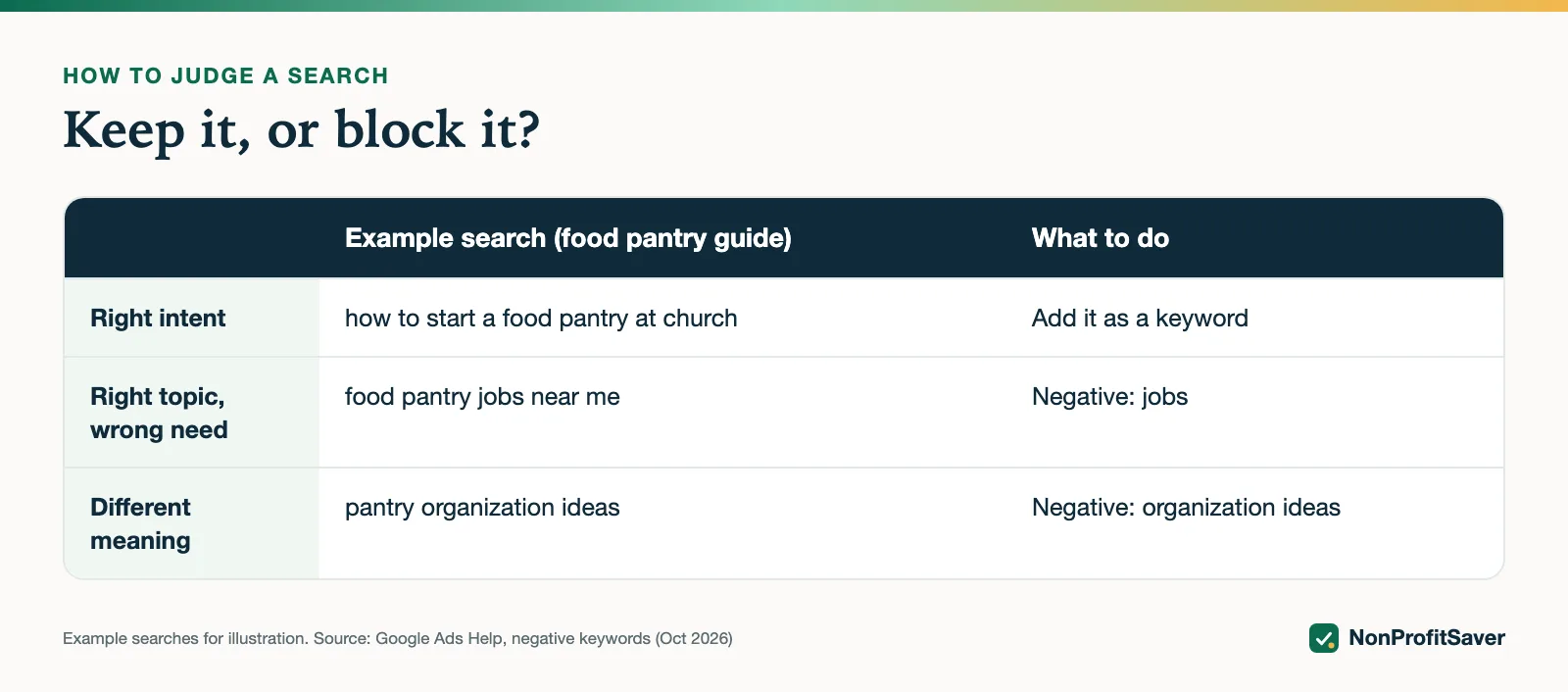
Sort by impressions, then ask one question per row: does the page this ad lands on answer this search? Four answers:
| What you see | Example (for a food pantry guide) | What to do |
|---|---|---|
| Right intent, good clicks | how to start a food pantry at church | Add it as a keyword if it isn't one |
| Right topic, wrong need | food pantry jobs near me | Add a negative: jobs |
| Different meaning of your words | pantry organization ideas | Add a negative: organization ideas |
| A different organization or place | [another charity's name] food pantry | Add a negative for that name |
The compliance guide also suggests using this report the other way round: find multi-word searches with a good click-through rate and add them as keywords (Google's compliance guide). Each one you add is a search you now answer on purpose.
How negative keywords actually match
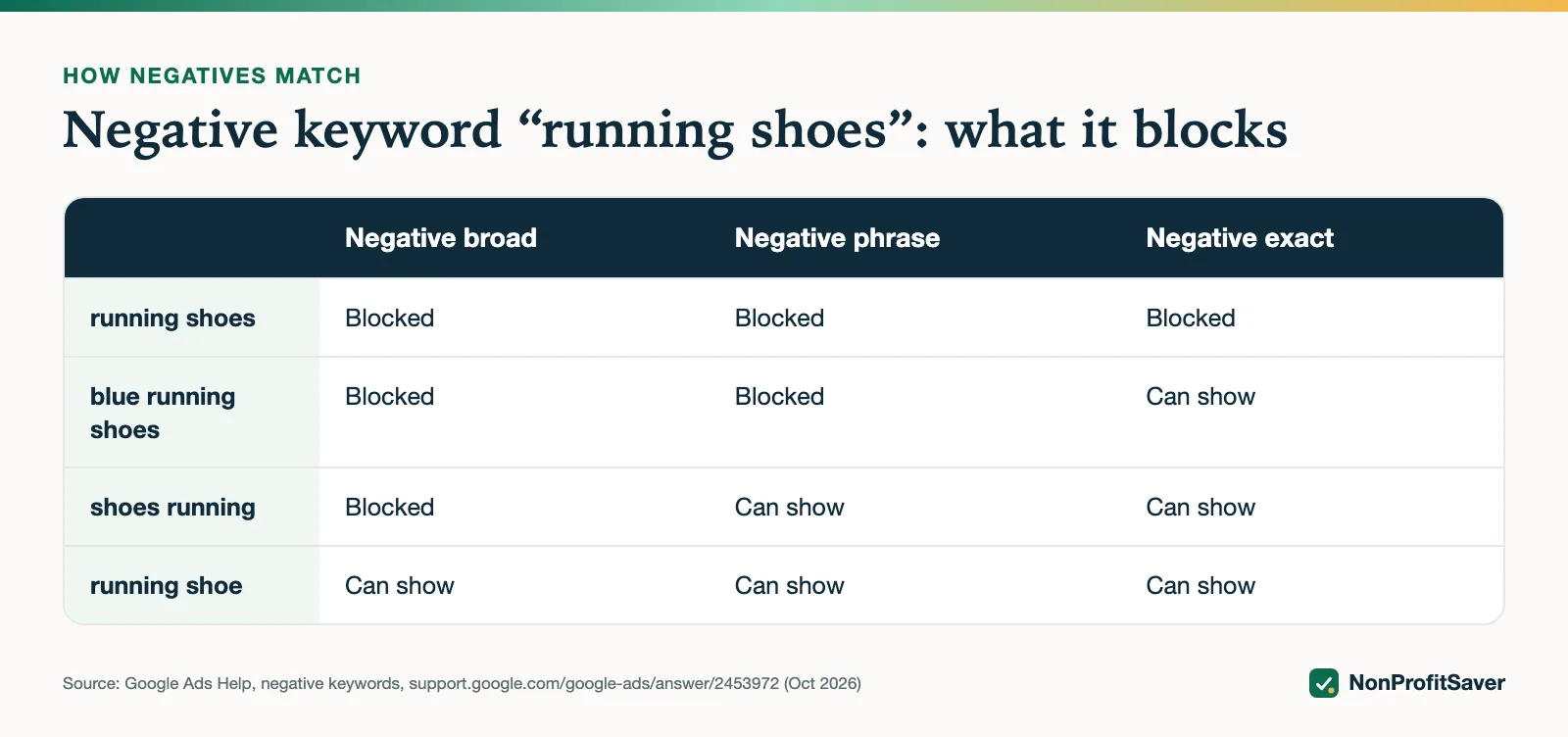
Negative keywords don't behave like positive ones. Google's negative keywords page uses the negative "running shoes" to show it:
| Search | Negative broad | Negative phrase | Negative exact |
|---|---|---|---|
| running shoes | blocked | blocked | blocked |
| blue running shoes | blocked | blocked | can show |
| shoes running | blocked | can show | can show |
| running shoe | can show | can show | can show |
Two rules follow from Google's page:
- Negatives don't match close variants. "running shoe" isn't blocked by "running shoes". Google says to add synonyms and singular and plural forms yourself.
- Casing and misspellings are handled. Google says negatives "automatically account for casing and misspellings".
For most grant accounts, single-word broad negatives (jobs, salary, free download) are the workhorse: they block any search containing that word, in any order.
Real example: the negatives on SENT (ES)
Storyline, the nonprofit that runs alongside NonProfitSaver, posted its Spanish campaign SENT (ES) on 23 October 2026. It promotes free evangelism training. Storyline set 29 campaign-level negative keywords before launch, while sorting Keyword Planner ideas into "our pages answer this" and "this wants something else" (the reasons below are our reading of each search):
| Group | Negatives | Why |
|---|---|---|
| Jobs and study (English) | jobs, salary, hiring, career, degree, seminary | Ministry job and seminary searches; the pages are free training, not employment or degrees |
| Jobs and study (Spanish) | empleo, trabajo, sueldo, seminario | The same in Spanish |
| Catholic parish searches | católica, catolica, católico, catolico, parroquia | Searchers looking for Catholic parish material, which these pages don't offer |
| Prayer intent | oración, oracion, hablar con jesus, hablar con jesús, hablar con jesucristo | People looking to pray or talk with Jesus, not to learn to share their faith |
| Street evangelism | calle, calles | The pages teach sharing faith with people you already know |
| Other groups | testigos de jehová, testigos de jehova, mormón, mormon | Searches about other religious groups |
| Entertainment | netflix, game, juego | Film and game searches |
Patterns worth copying:
- Both accent forms. Google says negatives handle misspellings, but we couldn't find whether that includes missing accents in Spanish, so we added both "católica" and "catolica". It costs nothing.
- Singular and plural. "calle" and "calles" are both listed, because Google says negatives don't cover plurals.
- Both languages. The campaign targets the United States among its 20 locations, so the English job and study terms stay in alongside the Spanish ones.
What we can't show you yet: the Search terms report for SENT (ES). The campaign is days old, and we won't describe results we don't have. We'll update this page once there are enough searches to read.
A weekly 10-minute routine
- Open Search terms for the last 7 days, sorted by impressions.
- For each search with impressions and no clicks, decide: answer it (keyword), block it (negative), or leave it (too early to tell).
- Add negatives at campaign level, or in a shared negative keyword list if several campaigns need them.
- Add good multi-word searches as phrase and exact keywords in the ad group whose page answers them.
- Look for single-word searches matching your ads. Google's mission policy suggests exact-match negatives for those.
- Note what you changed. If the account's click-through rate is falling, this list tells you why. More fixes: the 5% CTR rule.
When not to add a negative
Be careful with negatives that are part of your own keywords. A negative "free" on a campaign whose ads say "free training" would block searches like "free evangelism training", which is exactly who you want. Read your keyword list against your negatives before posting: search the keyword list for each negative word, and if one turns up inside a keyword you want, drop or narrow that negative.
Doing this with or without help
The report, the negatives and the routine above are all free in Google Ads. If you want the routine written down with a template, our Google Ad Grants Kit ($97 once, early access; sales haven't opened yet) includes a weekly check and a campaign builder that puts your negative list into the Google Ads Editor import file. Plain about our interest: it's our paid product, and you don't need it to do this. To build the negatives into a new campaign in one paste, see Google Ads Editor for Ad Grants.
Frequently asked questions
Where is the search terms report in Google Ads?
Select Campaigns in the left menu, then Insights and reports, then Search terms. It shows the real searches that triggered your ads, with impressions, clicks and the match type.
Do negative keywords block plurals and misspellings?
Google says negative keywords account for casing and misspellings automatically, but not close variants, synonyms or singular and plural forms. Add those yourself.
How often should I check search terms in an Ad Grants account?
Weekly while a campaign is new, then at least monthly. Off-intent searches with impressions and no clicks pull down the 5% account click-through rate.
Related guides
- Google Ad Grants for Nonprofits: How It Works, the Rules and the Catch
- Google Ad Grants for Churches: Who Qualifies and What Paperwork Works
- How to Apply for Google Ad Grants, Step by Step
- Google Ad Grants Requirements: The Compliance Checklist
This guide is general information, not legal, tax, or financial advice. Prices change; see each linked source. Report a correction.